
Whether you are running a busy school office, sorting stock in the back of a charity shop, or managing a bustling commercial depot, a locked door means constant interruptions.
Workplaces can now use highly access control systems—like key fobs, swipe cards, or PIN keypads—to let staff move around securely. These systems are fantastic for team members. But what happens when someone outside the organisation arrives?
That is where visual verification comes in. Adding a video intercom to your existing access setup isn't about replacing what works; it's about adding a premium layer of convenience. It gives you the simple, powerful ability to look a courier, a parent, a volunteer, or a visitor in the eye and confirm who they are before the lock ever clicks open.
Why Video Intercoms are the Ultimate Companion to Fob Systems
Standard fob readers and PIN pads are brilliant at managing "known" users (your staff, teachers, or regular volunteers). They are secure, reliable, and practically ubiquitous for a reason. However, every business has to handle "unknown" users—delivery drivers, contractors, or unexpected visitors.
Solving the "Blind Buzzing" Challenge on Busy Days
For years, the go-to add-on for visitor entry was a simple audio-only "buzz-in" intercom. You’d hear a crackle of static, a voice would claim they had a delivery, and you’d hit the button to let them in.
But audio alone can occasionally lead to what we call "blind buzzing." If a receptionist is on the phone, a client is waiting at the desk, and the intercom starts buzzing, the natural temptation is to just hit the release button to clear the noise. It isn't a failure of the lock itself; it's just human nature when things get busy. By pairing your physical locks with visual confirmation, that guesswork vanishes.
Reducing Cognitive Load for Front-Desk and Retail Staff
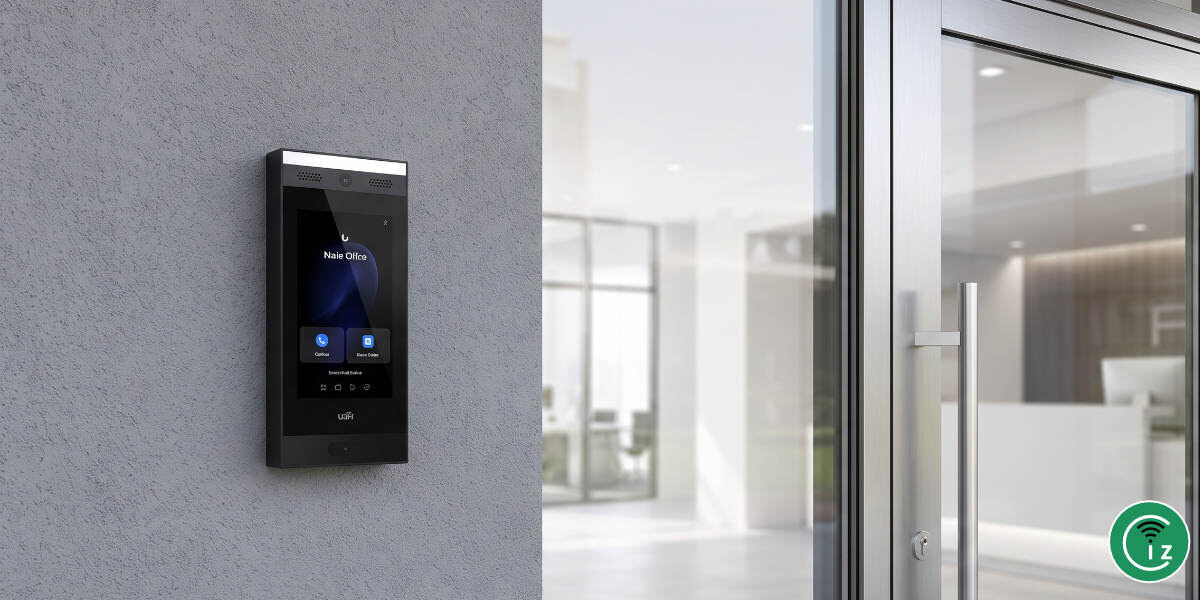
To take your entrance security to the next level, you want to look at the hardware at the front door. This is where the UniFi Access Intercom comes into play. It acts as the perfect front-of-house companion to your existing electronic door strikes and fob systems, providing a premium, hardwired visitor gateway.
Visual Verification in Action: The Power of a High-Definition Door Terminal
To take your entrance security to the next level, consider the hardware on the front door. This is where the UniFi Access Intercom comes into play. It acts as the perfect front-of-house companion to your existing electronic door strikes and fob systems, providing a premium, hardwired visitor gateway.
High-Definition Optics: Clear Eyes on the Entrance
At the heart of the UniFi Intercom is a wide-angle, high-definition camera. When someone stands at your threshold, you aren’t looking at a blurry, pixelated shadow. You get a sharp, wide-angle view of the visitor and their immediate surroundings, ensuring no one is hiding just out of sight.
📹 Tech Focus: Product Design & Capabilities
Want to see how the touch-screen directory operates and inspect the physical build of the terminal before planning your install? Ubiquiti have a helpful video that demonstrates how the intercom works.
Weatherproof Ruggedness and Low-Light Performance
Irish weather is known for its unpredictability, and front doors are rarely protected from the elements. The UniFi Intercom features a robust, weatherproof chassis built to withstand wind, rain, and freezing winter temperatures (IP65 rain-resistant). Crucially, it also features integrated night illumination via a built-in LED floodlight and smart low-light performance. Whether it is installed at a sleek, bright corporate lobby, or the dimly lit back-alley delivery entrance of a busy charity shop, the image remains sharp and readable.
Real-Time Access Routing: From Doorbell to Desk (and Smartphone)
Having a great camera at the door is only half the battle. The real magic happens in how that video feed gets to your team, wherever they happen to be on the premises.
Fixed vs. Mobile: The Role of the UniFi Intercom Viewer and Identity App
In a traditional setup, you had to run back to a fixed wall monitor to see who was there. The UniFi ecosystem gives you the best of both worlds:
- The UniFi Intercom Viewer: A compact touch-screen terminal that can be mounted on a desk or a wall. It is the perfect dedicated station for a receptionist, school secretary, or main office.
- The UniFi Identity App: For staff on the move—like a charity shop manager sorting donations downstairs, or a school caretaker working across campus—the call routes directly to their smartphone.
Step-by-Step Workflow: Seamless Visual Triage and One-Touch Unlock
- The Visitor Arrives: The visitor presses the clear touch-screen button on the external UniFi Intercom.
- The Call Routes: The call instantly rings on the desk-mounted Intercom Viewer and designated smartphones simultaneously.
- Visual Triage: Staff see the live HD video feed immediately. They can talk to the visitor using two-way audio to clarify their business.
- One-Touch Unlock: Once satisfied, staff tap a single button on their screen to safely release the electronic door strike.
Keeping Audit Logs: Tracking Entrants Automatically
Every time someone requests entry, the system doesn't just let them in—it keeps a record. The system automatically logs the time, date, and a snapshot of the visitor. If a door is left propped open or an unauthorised entry is attempted, you have a clear, timestamped visual trail ready to review.
Configuration & Call Routing Rules
Versatile Access Models: Adapting to Diverse Business Needs
One of the reasons we love deploying this system is that it isn’t a rigid, one-size-fits-all solution. It adapts to the unique operational circumstances of different organisations.
The Retail and Charity Shop Model: Handling Deliveries and Volunteers Safely
Charity shops and local retail units run on a mix of staff and fluctuating volunteers. When deliveries arrive at the back door, volunteers don't have to leave their station or risk opening the door blindly. They can verify the delivery driver from the safety of the main counter, keeping stock rooms secure.
The Educational Model: Securing the Perimeter for Peace of Mind
While these principles apply to any retail space or charity shop, they are doubly critical when designing a safe environment for childcare & school access control. School administrators can keep main gates and external doors locked throughout the school day, visually screening late-arriving students, parents, or visiting contractors before they ever cross the threshold.
Temporary Digital Keys: Scheduling PIN Codes for Trusted Visitors
You don't always need to answer the door manually. For regular delivery couriers, cleaners, or trusted contractors, you can generate temporary PIN codes. These codes can be scheduled to only work during specific windows—say, between 8:00 AM and 10:00 AM on Tuesdays—giving them frictionless access without compromising your security after hours.
Installation & Deployment Blueprint: Professional Implementation Best Practices
Getting a system like this up and running requires a professional, structured approach. It isn't just about screwing a box to the wall; it is about proper planning, positioning, and network infrastructure.
Physical Mounting, ADA Compliance, and Ideal Field-of-View
When mounting the UniFi Intercom, we pay close attention to height and positioning. We ensure the camera's field of view captures both tall delivery drivers and those using wheelchairs. The goal is to make the touch screen easy to reach and the camera angle spot on.
Power over Ethernet (PoE) and Network Redundancy Basics
The beauty of the UniFi Intercom and Intercom Viewer is that they run on Power over Ethernet (PoE). This means a single, neat Ethernet cable provides both high-speed data and stable power. There is no need to run expensive, high-voltage power lines down to your door frames, which is a massive win for heritage buildings and older shopfronts.
Frequently Asked Questions
Can a single UniFi Intercom route calls to multiple staff members or devices simultaneously?
Yes, absolutely. Through the UniFi Access Call Manager, we can program a single press of the intercom button to ring multiple Intercom Viewers, computer terminals, and staff smartphones simultaneously. This ensures visitors are never left waiting on the doorstep, even if the primary receptionist has stepped away from their desk.
How does the system handle access control if the building’s internet connection goes down?
This is a really important point. While remote smartphone routing and off-site cloud changes do require an internet connection, the core visual verification and door-unlocking features between the UniFi Intercom and your on-site Intercom Viewer operate entirely over your Local Area Network (LAN). If your internet service provider goes offline, your local entry-management continues to work safely and securely.
Is the UniFi Intercom difficult to install on older storefronts or heritage buildings?
Not at all. Because the system runs on standard Power over Ethernet (PoE) technology, we only need to run a single, low-voltage network cable to the door frame. This vastly simplifies installation in older stone buildings, retail shopfronts, and charity shops where drilling massive holes or routing heavy electrical wiring is either restricted or physically impractical.
Finding the Right Fit for Your Property
At the end of the day, a locked door shouldn't feel like a barrier to your own team's productivity. By pairing robust physical locking hardware with smart, real-time visual verification, you can keep your premises completely secure without slowing down your day-to-day operations.